Back catalogs
Move many older tracks, mixes, recordings, sermons, or episodes through one repeatable workflow.

Upload MP3s, DJ mixes, radio shows, sermons, archive recordings, and podcast episodes when needed. Audioship turns them into YouTube videos with artwork, metadata, scheduling, and repeatable publishing defaults.
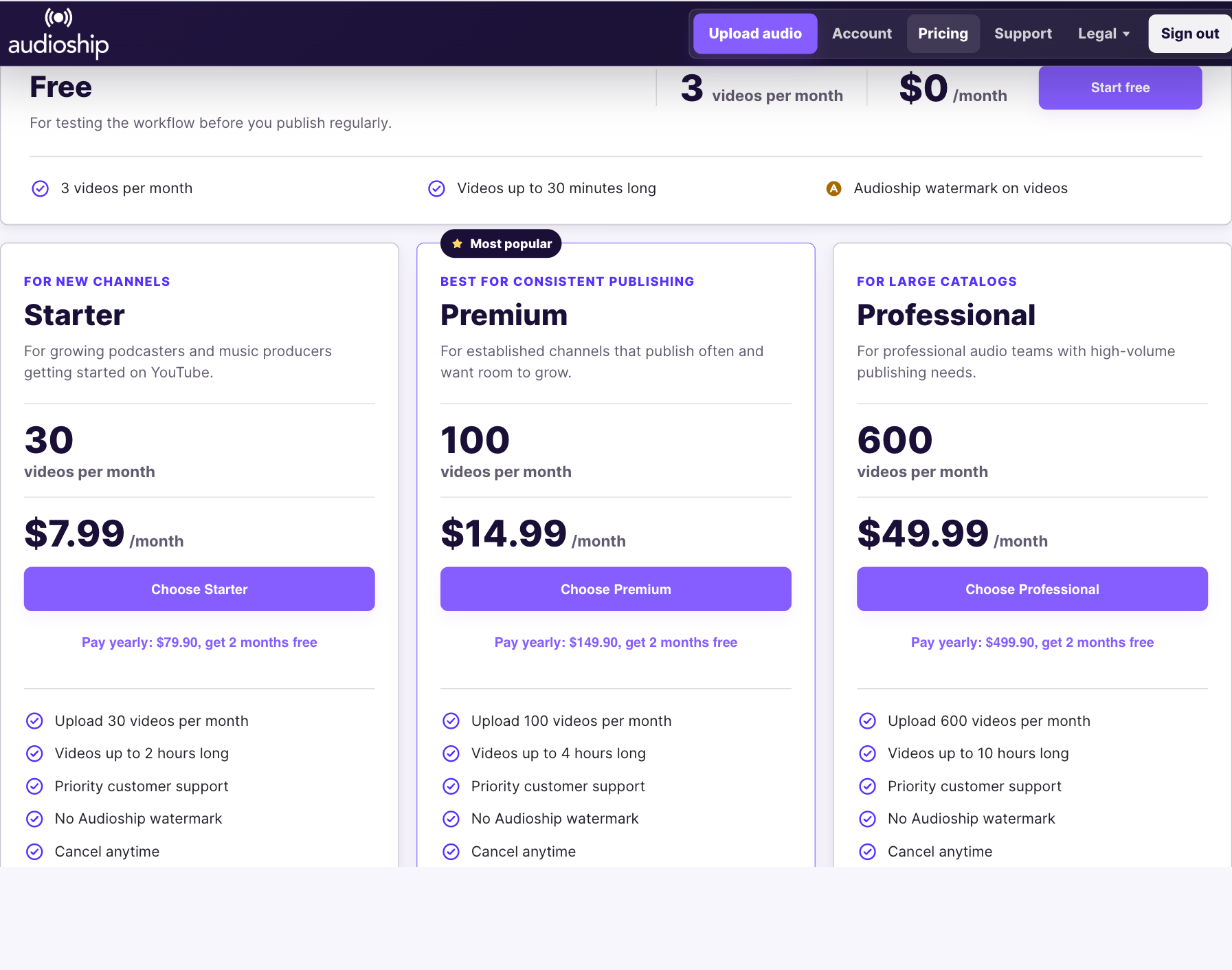
Free test drive: 3 videos/month, 30 minutes max, Audioship watermark. No credit card needed.
Audioship becomes valuable when you have a catalog, a weekly show, or a channel where every upload needs the same professional setup.
Move many older tracks, mixes, recordings, sermons, or episodes through one repeatable workflow.
Reuse artwork, descriptions, privacy, and channel defaults instead of rebuilding every upload.
Upgrade when watermark removal, longer videos, and higher monthly volume matter.
Paid plans remove the watermark and raise monthly volume for recurring publishing.
For proving the workflow before you publish regularly.
Start freeFor churches, radio, music channels, and podcasters that publish consistently.
Compare PremiumFor teams and archive projects moving a lot of long-form audio.
Compare ProfessionalOccasional publishing? Starter is available on the pricing page with 30 videos/month and no watermark.
Audioship handles the conversion and upload steps so repeat publishers can focus on the catalog, not the video production work.
Upload audio in bulk, with RSS import available when a podcast catalog needs it.
Choose cover art, presets, or saved visuals for the YouTube video.
Reuse titles, descriptions, privacy, tags, and channel choices for repeat publishing.
Send the finished videos to the selected YouTube channel now, privately, or on a schedule.
Each route leads directly into the upload workflow with the right starting point.
Queue recurring channel uploads with consistent cover art, descriptions, privacy settings, and multi-file mixes.
Upload audio filesTurn sermons, talks, and services into YouTube videos with a repeatable template for each week.
Upload a sermonWork through large collections with bulk upload, saved defaults, and plan limits that match catalog work.
Start a batchUse Audioship when you need editable metadata, reusable artwork, and a controlled upload order instead of a one-size RSS mirror.
Import podcast RSSAudioship is a publishing tool connected to your YouTube account, so the page should answer buyer-risk questions directly.
Audioship requests YouTube upload permission so it can publish to the channel you choose. We never ask for your YouTube password.
Audioship monthly quota and YouTube's 24-hour upload cap are separate limits, so you can diagnose the right constraint.
Paid plans are handled through secure Stripe checkout and subscriptions can be managed from your account.
Select many audio files and move them through the YouTube publishing workflow together.
Keep descriptions, privacy, artwork, tags, and channel choices consistent across recurring uploads.
Combine multiple audio files into one YouTube video for DJ sets, talks, collections, and archives.
Move beyond short free tests with paid plans built for 2-hour, 4-hour, and 10-hour audio.
Prepare videos privately or schedule publishing around your channel calendar.
Bring podcast episodes into Audioship when RSS is the right input for a smaller catalog segment.
Yes. Audioship accepts common audio formats including MP3, WAV, FLAC, M4A, OGG, OPUS, AAC, and WMA.
YouTube requires a video file. Audioship creates the video with your artwork and publishes it to YouTube.
Free includes 3 videos per month up to 30 minutes with an Audioship watermark. No credit card is needed to try it.
Paid plans remove the Audioship watermark and raise monthly upload and duration limits.
YouTube's cap is separate from your Audioship monthly quota. If YouTube rejects a batch for that reason, you should wait and retry when YouTube allows more uploads.
Only upload audio, artwork, and metadata that you have the rights to publish.
YouTube RSS can be enough for simple podcast mirroring. Audioship is for back catalogs, editable metadata, reusable visuals, scheduling, bulk files, and mixed audio workflows.
Yes. Subscriptions can be managed from the account page.
Start with Free, then choose the plan that matches your monthly upload volume.